

What AI Skills Do Business Professionals Need in 2026
AI skills for business professionals combine technical awareness with human judgment because useful instructions still require accurate sources, professional knowledge, and careful review.
The seven essential skills include the following.
- AI literacy and an understanding of model limits
- Clear prompting and task definition
- Critical evaluation and fact-checking
- Data literacy and interpretation
- Workflow design and AI supervision
- Privacy, cybersecurity, and responsible AI use
- Subject expertise, communication, and adaptability
These abilities apply across departments. A marketing specialist may use AI to prepare a campaign outline, while a financial analyst may use it to identify patterns in approved records. Each professional still needs to confirm the information and decide how the company should use it.
Why AI Skills Matter in Today’s Workplace
As AI adoption expands, employers are changing their skill requirements and adding AI to common software and business processes. LinkedIn's 2026 labor market report states that U.S. jobs requiring AI literacy grew 70% year over year. The report includes technical and nontechnical roles, which suggests that AI knowledge now applies beyond software development and data science.
This increase shows how AI literacy can affect your position in the job market, even when your role does not focus on building technology.
The World Economic Forum's Future of Jobs Report 2025 identifies AI and big data, networks and cybersecurity, and technological literacy as the three fastest-growing skills. The surveyed employers also expect 39% of workers' existing skill sets to change or become outdated between 2025 and 2030.
The same report identifies analytical thinking as the most sought-after core skill. Employers also value human skills such as creative thinking, resilience, flexibility, leadership, and lifelong learning.
Georgia employers use AI in financial services, healthcare, manufacturing, public safety, marketing, and business software. Atlanta companies also need employees who can prepare data, protect systems, explain products, manage risks, and introduce new technology into established operations. The report on AI companies in Atlanta shows how these responsibilities extend across technical and business roles.
Education and workforce programs also respond to these needs. The PATH initiative connects AI education with practical experience and employer requirements. The article on AI workforce development in Georgia explains how the program helps students prepare for AI-enabled careers.
Seven Essential AI Skills for Business Professionals
1. AI Literacy and Model Limits
AI literacy helps you understand a system's AI capabilities, information requirements, and limitations. A large language model predicts words based on patterns in its training data and other available information. It does not confirm every statement before presenting an answer.
An AI tool may misunderstand your request, use outdated information, invent a source, or overlook important context. Treat its response as material that requires review, and recognize when a task requires a qualified professional.
2. Clear Prompting and Task Definition
Prompt engineering involves giving an AI system clear context, source material, instructions, limits, and output requirements. Clear instructions help the system produce a more relevant response and make errors easier to detect.
For example, ask an AI assistant to summarize an approved report for a sales manager, identify five findings, preserve every figure, and cite the page for each claim. This request sets a clearer standard than a command to “summarize this.”
You should also know when to ask follow-up questions, provide an example, or divide a complex assignment into smaller steps. The right approach depends on the task, the information involved, and the consequences of an error.
3. Critical Evaluation and Fact-Checking
Critical evaluation allows you to decide whether an AI response is accurate, complete, and suitable for its intended use. Start by checking names, dates, figures, quotations, calculations, and links against reliable sources. Then look for missing context or assumptions that could change the conclusion.
Microsoft's 2026 Work Trend Index found that surveyed AI users considered quality control and critical thinking especially important as AI handled more work. Eighty-six percent said they treated AI output as a starting point and remained responsible for the thinking.
Strengthen this skill by comparing important claims with original reports, official records, or approved company data.
4. Data Literacy and Interpretation
Data literacy helps you perform or review data analysis by examining what a dataset measures and where it may contain gaps. You should be able to identify the source, date range, sample, definitions, missing values, and possible errors before you accept an AI-generated analysis.
An AI system may create a polished chart from incomplete or incorrectly labeled data. It may also describe a correlation as if one factor caused another. You need to examine the underlying records and ask whether the evidence supports the explanation.
Most roles do not require advanced statistics. You should still understand percentages, averages, trends, comparisons, and basic data quality.
5. Workflow Design and AI Supervision
Workflow design means deciding which tasks a person should complete, which tasks an AI system may support, and where the process requires approval. A safe workflow gives the system a defined purpose and limits its access to information and software.
Map one repeated process from start to finish, including its inputs, decisions, outputs, and responsible employees. Companies often begin workflow automation with low-risk, repetitive tasks that employees can review before the process expands.
Agentic AI systems can perform several connected actions, so they require stricter permission controls, records, testing, and approval rules. Human oversight should remain in place before an AI system changes records, sends payments, publishes information, or affects an employee.
Local programs provide examples of this division of work. Georgia Tech Manufacturing 4.0 shows how manufacturers combine AI, connected systems, and human expertise in production environments.
6. Privacy, Cybersecurity, and Responsible AI Use
Data privacy rules should define whether employees may enter customer data, employee records, financial details, legal documents, or confidential files into an AI system. Organizations may apply strict controls or prohibit the use of certain information entirely.
Review your employer's policies and the provider's data terms before you upload workplace information. Protect each approved account with a unique password and multifactor authentication. The report on Atlanta cybersecurity explains how local teams connect AI development with open-source security work.
The NIST AI Risk Management Framework gives organizations a voluntary structure for managing AI risks. Its core functions ask organizations to govern, map, measure, and manage risk. Professionals can support that work by reporting errors, following approval rules, and documenting how they use AI. The article on Georgia AI governance explains how state agencies are developing local oversight practices.
7. Subject Expertise, Communication, and Adaptability
Your professional knowledge gives you a basis for judging AI-generated work. An accountant can detect a questionable financial assumption. A human resources manager can identify missing employment context. A cybersecurity specialist can reject unsafe technical advice.
You may need to explain which work involved AI, what sources you checked, and why you accepted or rejected a recommendation. Managers must set clear quality standards and assign responsibility for each decision.
AI products, employer policies, and job requirements will continue to change. Continuous learning can help you update your methods while preserving the knowledge and judgment that your role requires. You can also compare employers and career areas in the guide to Atlanta tech jobs.
How to Develop AI Skills Through Real Work
Connect your training to a real responsibility. Choose a frequent, low-risk task with an output that you can review, then record how long the process takes and what a good result requires. Business leaders can support structured learning paths that connect AI training with approved tools, real responsibilities, and measurable outcomes.
You can then follow these steps.
1. Select one approved tool and one clearly defined task.
2. Use public, fictional, or authorized information during the first test.
3. Compare the AI-assisted result with your usual process.
4. Check the output for factual, reasoning, privacy, and formatting problems.
5. Record the instructions and review methods that improved the result.
6. Measure any change in time, quality, cost, or error rate.
7. Ask a manager or qualified colleague to review the process before wider use.
A certificate can show that you completed a course, while work samples can demonstrate your ability. Create a prompt guide, accuracy checklist, workflow map, or short case study. Remove confidential information before sharing an example.
A 30-Day AI Skills Development Plan
Week 1: Covers the Fundamentals
Learn the differences among generative AI, machine learning, automation, and AI agents. Review your employer's policies, then test a simple task with public information.
Week 2: Improves Your Instructions
Practice defining the goal, audience, sources, constraints, and format. Save the approach that produces the most useful and reviewable result.
Week 3: Strengthens Your Review Process
Check each claim against an original source. Review calculations and identify missing context. Create a short checklist that matches the risks in your work.
Week 4: Tests One Workplace Process
Apply the skills to one approved task. Measure the result against the original process and ask a qualified person for feedback. Keep a record of the tool, instructions, sources, review process, and final result so you can explain what worked.
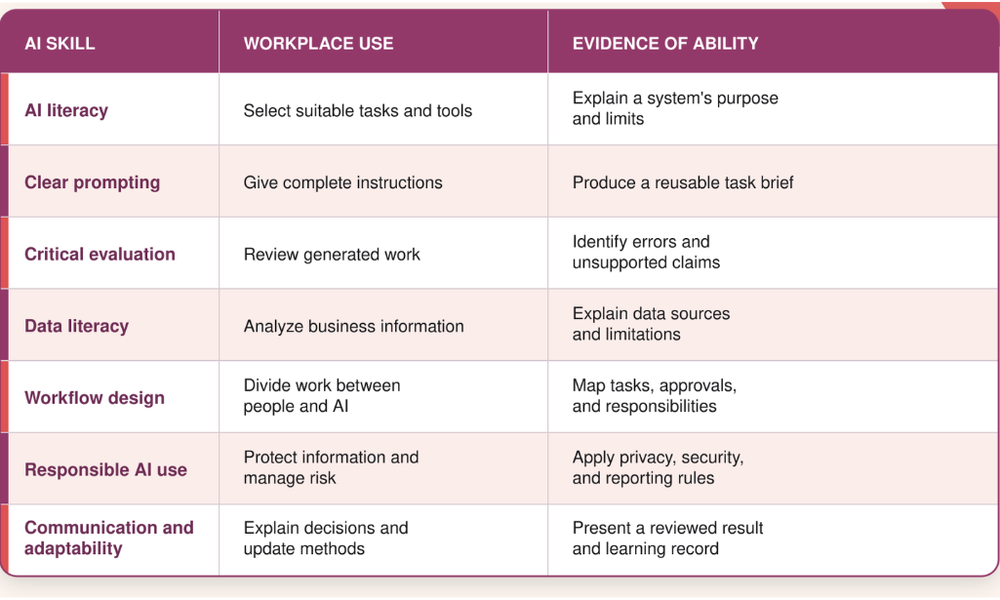
AI Skills and Workplace Uses at a Glance
The table below connects each skill with a practical workplace use and a way to demonstrate your ability. You can use it to identify the area that deserves your attention first.
Build AI Skills That Support Your Career
The most useful AI skills help you direct a task, evaluate the evidence, protect information, and produce work that meets a clear standard. Choose one responsibility from your current role, practice with an approved tool, and document what you learn. Small, careful tests can help you build experience without exposing your company or clients to unnecessary risk.
Explore Peach State Tech for current reporting on AI skills, workforce programs, technology employers, and the companies shaping Georgia's economy. You can use this reporting to track how new technologies affect careers and business decisions across the state.